Dzikir App on Apple Watch and Wear OS
The Apple Watch and Wear OS apps come with Dzikir App on your iPhone or Android phone. They show the next prayer and today's prayer times, let you count tasbih with taps or the crown, and point to the Qibla. Your phone keeps them up to date, and they keep working for days without it.
Quick start
- Install Dzikir App on your phone and open it once so it loads your prayer times and tasbih.
- Apple Watch: the watch app installs with the iPhone app. If it doesn't appear, open the Watch app on your iPhone, find Dzikir App under Available Apps and tap Install.
- Wear OS: install Dzikir App on the watch from Google Play (search on the watch, or choose your watch when installing from your phone).
- Open Dzikir App on the watch. It shows "Open Dzikir App on your phone to sync" until your phone sends the first update.
- Add the next prayer to your watch face: touch and hold the face, tap Edit, then pick Dzikir App for a complication. On Wear OS you can also add the Prayer Times Tile.
In detail
Prayer times
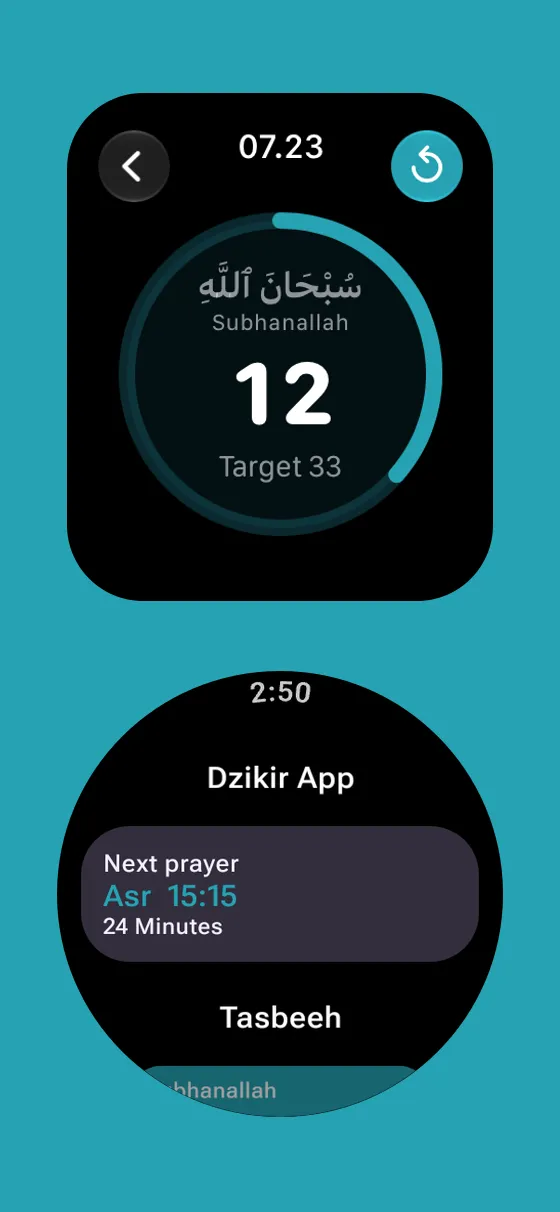
The home screen shows the next prayer with a countdown, and a tap opens today's prayer times.
- The watch keeps the coming week of prayer times, so it stays right even when your phone is far away.
- Times follow the location set in the app on your phone.
- Prayer reminders come from your phone and show on your watch like your other notifications.
Tasbih counter
Pick a dhikr from your tasbih list and count on your wrist.
- Tap anywhere on the screen, or turn the Digital Crown or rotating bezel, to count. Each count gives a light tap, and reaching the target gives a stronger one.
- The ring fills toward your target, and a check mark shows when you're done.
- Reset asks first, so a stray tap can't clear your count.
- Your watch counts are added to the same dhikr on your phone the next time Dzikir App is open there.
Watch face, Tile and Smart Stack
Keep the next prayer in view without opening the app.
- Apple Watch: complications for the corner, circle, inline and rectangular slots, and a widget in the Smart Stack.
- Wear OS: complications for short, long and progress slots, and a Prayer Times Tile (swipe from the watch face).
- They move on to the next prayer by themselves.
Qibla
The Qibla screen points the way from your location.
- Turn until the pointer points up; the screen says "Facing the Qibla" when you're facing it.
- It needs a watch with a compass. Without one, the screen shows the Qibla bearing in degrees.
Language and colors
The watch follows the language and theme color you chose in the phone app.
- Right-to-left languages such as Arabic, Urdu and Farsi read right to left on the watch too.
Tips
- Put the next-prayer complication on the face you use most for a glance at each prayer time.
- Open Dzikir App on your phone after counting on the watch to add your counts to today's total right away.
Frequently asked questions
Which watches are supported?
Apple Watch with watchOS 10 or later, paired with an iPhone that has Dzikir App, and Wear OS 4 or later watches paired with an Android phone that has Dzikir App.
Why does my watch say "Open Dzikir App on your phone to sync"?
The watch hasn't received your prayer times and tasbih yet. Open Dzikir App on your phone with the watch nearby and it updates within a few seconds.
Do I need my phone nearby?
No. The watch keeps a week of prayer times and your counts. Your counts reach your phone the next time both are connected and Dzikir App is open on the phone.
Still need help?
Questions, bug reports and feedback are welcome. Contact us from the Support page, or from Settings → Support and Help in the app.
Contact support© 2026 TIM SYAAP SYAAP All rights reserved.