How to see prayer times and get reminders
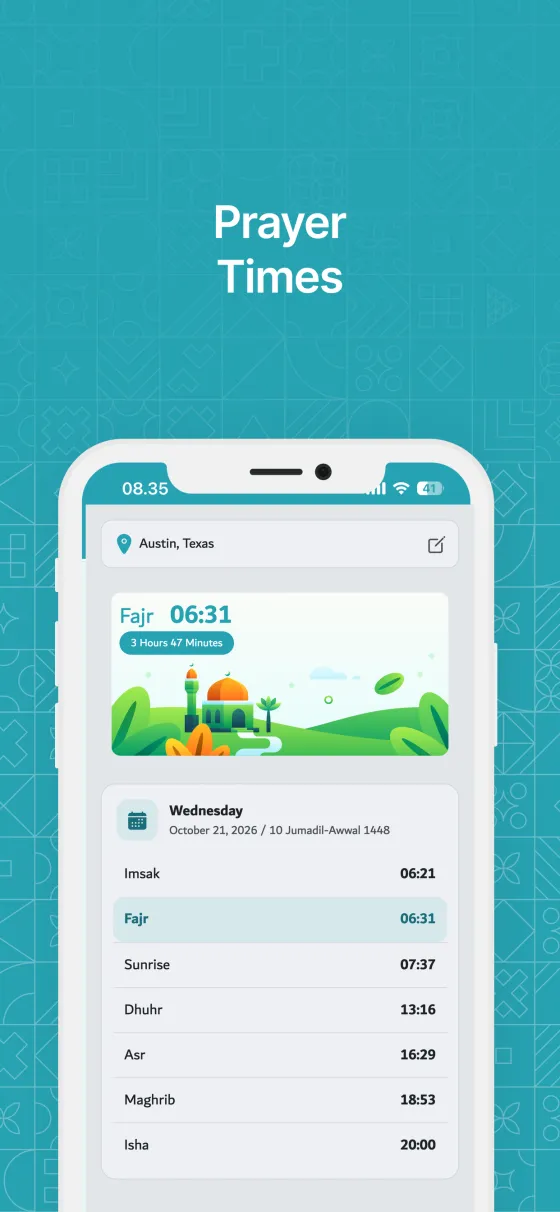
The Prayer tab shows today's prayer times for where you are, and the app can remind you when each prayer begins.
Quick start
- Open the Prayer tab, or the Prayer Times tile on Home.
- Allow location access when asked, or tap Choose Location and search for your city.
- Read today's times: Imsak, Fajr, Sunrise, Dhuhr, Asr, Maghrib and Isha.
- To be reminded, open Settings → Notifications & Reminders → Prayer Time Reminders.
In detail
Setting your location
Prayer times depend on where you are.
- With location access, the app finds your city automatically.
- Without it, tap Choose Location and search by city, state or country. Local names and regional city names work too.
- The location you choose is used for both the schedule and the reminders.
How times are calculated
The calculation method is chosen automatically for your country, so there is nothing to set.
- Times are loaded from the internet, so you need a connection to update them.
- Imsak is shown for reference before Fajr.
Prayer reminders: adhan, sound or silent
Each of the five prayers has its own reminder in Settings → Notifications & Reminders → Prayer Time Reminders.
- Turn on Turn On Notifications first if notifications are off.
- Switch on Active for each prayer you want to be reminded of.
- Choose what the reminder plays: Adhan (the opening of the adhan), Sound (your phone's notification sound) or Silent.
- Tapping Adhan or Sound plays it right away so you can hear it first. Tap Stop to end it.
- Prayer reminders stack together in your notifications, separate from dhikr reminders.
- On desktop, reminders come as system notifications with the same choice: Adhan, Sound (your computer's notification sound) or Silent.
- Reminders are set a week ahead from each day's own prayer times and refresh when you open the app, so they stay on time as the times change.
- Android 14 and later: allow Alarms & reminders when Settings → Notifications & Reminders asks, so reminders arrive at the exact minute.
Tips
- Travelling? Open the Prayer tab when you arrive so your location and reminders update.
- The Qibla tab sits right next to Prayer Times.
- Add the Prayer Times widget to see the next prayer without opening the app.
Frequently asked questions
Can I change the calculation method?
Not at the moment. The app uses the method commonly used in your country.
Why don't I get prayer reminders on the web?
A browser can't schedule reminders. Install the Android, iOS or desktop app to get them.
My city isn't found. What can I do?
Try the region, state or country name, or a nearby larger city.
Does the reminder play the whole adhan?
No. It plays the opening of the adhan, about 19 seconds, because phones limit how long a notification sound can be.
Still need help?
Questions, bug reports and feedback are welcome. Contact us from the Support page, or from Settings → Support and Help in the app.
Contact support© 2026 TIM SYAAP SYAAP All rights reserved.